

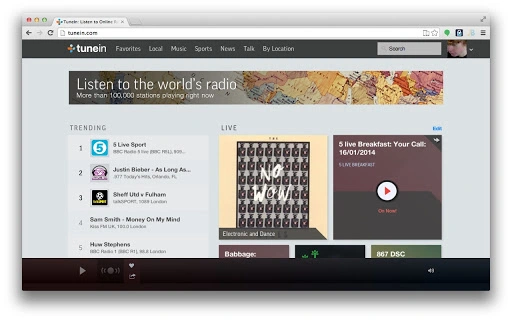
Description
Download TuneIn – Radio, Podcasts, Music, Live Streaming
Overview
The TuneIn desktop application provides users with access to a vast global radio network, enabling listeners to tune into over 70,000 live radio stations and two million on-demand audio programs. Designed for both casual listeners and dedicated fans of music, sports, news, and comedy, the software delivers a convenient way to stream audio content directly from the desktop. The app serves as a bridge between the user and TuneIn’s expansive platform, offering a streamlined interface for discovering and playing audio streams.
Although not an official TuneIn product, the application is developed by Phicorb and functions as a desktop launcher that redirects users to the official TuneIn website via a secure connection. This design choice is due to Chrome’s app policies, which restrict linking to third-party domains unless the site is owned by the developer. As such, the app does not host content itself but acts as a gateway to TuneIn’s full service. This makes it particularly useful for users who prefer a desktop shortcut for quick access to their favorite stations and podcasts.
Real-world usage scenarios include daily commutes, work breaks, background entertainment, and on-demand listening to interviews or live sports coverage. The app is ideal for individuals seeking a simple, fast way to access audio content without opening a web browser. Its lightweight design and minimal system footprint make it suitable for users across a range of devices.
Key Features & Capabilities
- Live Radio Streaming – Access over 70,000 live radio stations worldwide, spanning music genres, news, sports, talk shows, and more.
- On-Demand Audio Library – Explore two million podcasts, concerts, interviews, and special events available for playback at any time.
- Desktop Launcher Functionality – Provides a quick-access shortcut to TuneIn’s platform, reducing the need to manually navigate to the website.
- Seamless Web Redirection – Automatically redirects users to the official TuneIn site through a secure link, ensuring access to the full feature set.
- Platform Agnostic Access – Works across Windows and Mac, supporting users on multiple operating systems.
Each feature enhances the user experience by simplifying access to a rich audio ecosystem. For example, users can launch the app and immediately begin searching for a specific station or podcast, avoiding the time spent opening a browser and typing in a URL. The redirection mechanism ensures that all content is delivered through the official TuneIn service, maintaining consistency and reliability.
User Interface, Workflow & Performance
The user interface of the TuneIn desktop application is minimal and focused on functionality. The design prioritizes speed and simplicity, offering a clean window with a single entry point: a redirect to the TuneIn website. There are no complex menus or configuration options, which contributes to a streamlined workflow. Users can launch the app, and within seconds, be directed to the full TuneIn platform.
Navigating the experience relies entirely on the destination website, meaning the app itself does not include advanced search tools, playlists, or station customization. This limits the depth of interaction but also reduces the app’s complexity. The workflow is efficient for users who already know what they want to listen to and simply need a faster way to reach the site.
Performance observations are based on general software behavior patterns. The application is lightweight at 1.2 MB, suggesting minimal impact on system resources. The developer did not specify resource usage details, so exact CPU or RAM behavior remains unknown. Stability is expected to be consistent, as the app functions primarily as a redirector with no local processing or data caching.
Compatibility & System Requirements
The TuneIn desktop application is compatible with both Windows and Mac operating systems, making it accessible to a broad user base. It is designed for desktop environments and does not require any specific hardware beyond standard system capabilities. The installation size is 1.2 MB, indicating a minimal footprint and fast setup process.
Exact system requirements were not listed. The developer did not provide additional system requirements. Compatibility information is limited to the operating systems stated. Users should ensure their system supports Chrome Apps or the underlying web platform used by the application. The app may not function on older or unsupported OS versions.
Pros and Cons
Pros
- Lightweight at only 1.2 MB, ideal for quick installation and minimal resource use.
- Provides instant access to TuneIn’s full library of live radio and on-demand content.
- Simple, no-frills interface designed for fast launching and redirection.
- Available for both Windows and Mac, ensuring cross-platform accessibility.
- Free to download and use with no hidden costs or subscriptions.
Cons
- Does not include built-in search or playlist features—users must navigate the web version.
- Relies entirely on an external website for content delivery, limiting standalone functionality.
- Not an official TuneIn app, which may raise concerns about trust or support.
- Redirection may be less convenient for users who prefer full desktop integration.
- Version 1.0.0 suggests limited updates or development activity.
FAQ Section
Is this app officially made by TuneIn?
No, this is not an official TuneIn app. It is developed by Phicorb and serves as a desktop launcher that redirects users to the official TuneIn website.
Why does the app redirect to a different site?
Chrome’s app policies restrict linking to third-party domains unless the site is owned by the developer. To comply with these rules, the app redirects to a domain managed by Phicorb, which then forwards users to TuneIn.
Is the app safe to use?
Yes, the app is secure. It redirects to the official TuneIn website via HTTPS, ensuring encrypted communication. No personal data is collected by the app itself.
Can I use this app offline?
No, the app requires an active internet connection to stream audio content, as all media is delivered through the TuneIn website.
Does the app support automatic updates?
Automatic update functionality was not specified. Users should check the developer’s website or the listing page for update information.
Final Thoughts + CTA
The TuneIn desktop application offers a practical solution for users who want quick access to a massive library of live radio and on-demand audio. While it lacks advanced features and is not an official product, its lightweight design, cross-platform support, and free availability make it a compelling option for casual listeners. The app excels in simplicity and speed, serving as a reliable shortcut to the full TuneIn experience.
It is best suited for individuals who frequently use TuneIn and value convenience over deep integration. For those seeking a fully featured desktop client, this app may fall short. However, for users prioritizing ease of access and minimal system impact, it delivers value.
Download TuneIn now to enjoy seamless access to live radio, podcasts, music, and more from your desktop.
Guides & Tutorials for TuneIn Radio App for Chrome
How to install TuneIn Radio App for Chrome
- Click the Preview / Download button above.
- Once redirected, accept the terms and click Install.
- Wait for the TuneIn Radio App for Chrome download to finish on your device.
How to use TuneIn Radio App for Chrome
This software is primarily used for its core features described above. Open the app after installation to explore its capabilities.
User Reviews for TuneIn Radio App for Chrome 0
No reviews found





